If you want to create a cross section in the X-Z or Y-Z plane in a 3D vertical model, this corresponds to the View/cross section plot… ("vertical section") in a 3D horizontal model. Which coordinate plane is displayed is determined solely by the position of the section line to be defined by the user.
A section in the X-Z plane theoretically looks like this:
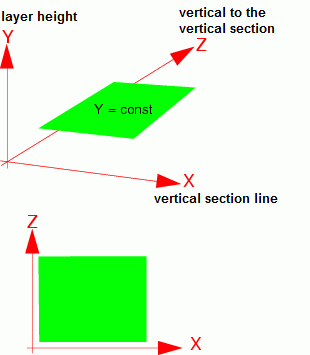
Representation in the X-Z plane
The conversion in SPRING takes place in the Create plot → View/cross section plot… by selecting a section line that runs approximately parallel to the X-axis (green line in the upper illustration). The result (lower figure) is a representation of the data (here: Z-coordinates from 0 to 2m) in the X-Z plane ("View of the dam wall from above").
|
|
|
|
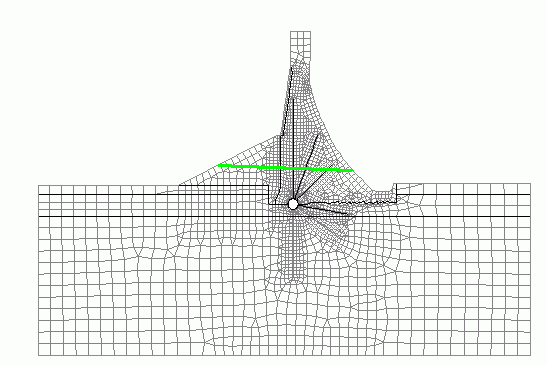

Display in the X-Z plane in SPRING
A section in the Y-Z plane theoretically looks like this:
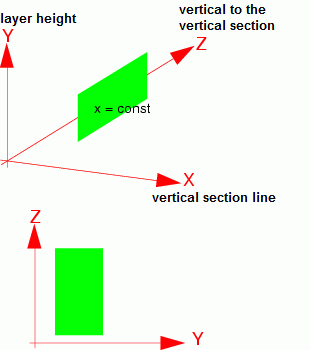
Representation in the Y-Z plane
The conversion in SPRING takes place in the Create plot  View/cross section plot… by selecting a section line that runs approximately perpendicular to the X-axis (green line in the figure on the left). The result (right figure) is a representation of the data (here: K-values) in the Y-Z plane ("view from the right onto the dam wall"). For a better visualisation, the resulting plot has been rotated 90° to the left.
|
|
|
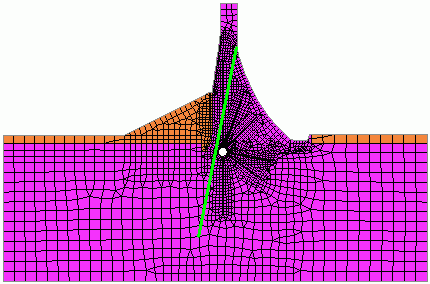

Display in the Y-Z plane in SPRING
Special features in the plot creation
Stand: 25.01.2025 | 