The 2D vertical model is extended into the third dimension perpendicular to the intersection. The thickness is then divided into 3D layers (Mesh  3D Divide layer...) so that the Z-coordinate (attribute ZKOR) represents the depth position. In contrast to 3D horizontal models, the Z-coordinates of the node layers in the 3D vertical model do not lie above but next to each other.
As a result, the Z-coordinates in the 3D vertical model increase from top to bottom, whereas in a 3D horizontal model they decrease as the layer number increases.
Example 3D vertical model: GELA (= 0.0), ZKOR2 = 1.0, ZKOR3 = 2.0, ZKOR4 = 4.0, etc. Failure to observe this arrangement will result in an error in the calculation!
The two figures below show the different layer arrangements and the corresponding coordinate system:
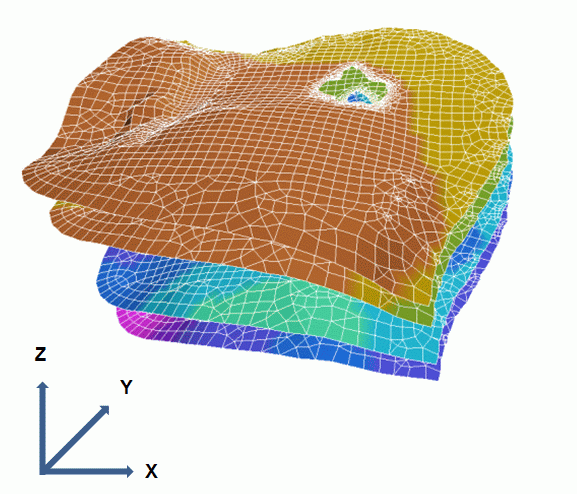
Layering and coordinate axes in the 3D horizontal model
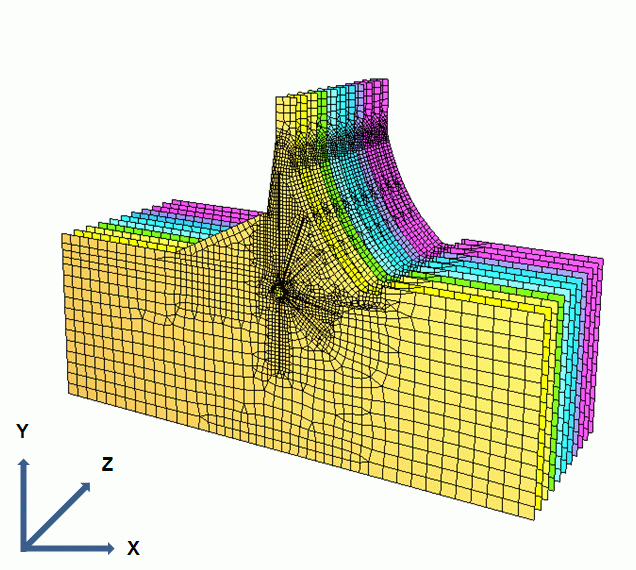
Layering and coordinate axes in the 3D vertical model
The first node layer of the Z-coordinates (= GELA) lies on the vertical section line and has the value GELA = 0.0. After saving the finished 3D vertical model, the identifier of the model type must be set to "V-3D" in the model file using any editor. This is necessary because only the user (and not the software) can decide whether it is a 3D horizontal model or a 3D vertical model. As a 3D vertical model is a very specialised application, there is no query as to which model type it is when a 3D model is saved. This manual change to the model type is only necessary once.
Visualization of sections in a 3D vertical model
Stand: 25.01.2025 | 